 PoppyDisk User Guide
Refresh Stale results
Trust a size again after the disk changed underneath the Scan.
When you finish, the changed branch has been measured again and no longer carries the Stale marking.
What Stale means
A Scan is a measurement taken at one moment. PoppyDisk keeps watching the scanned location afterwards. Files on a Drive change all the time, so everyday changes like caches, logs, and small updates pass quietly. Only a large operation counts: when the files under a folder grow, shrink, appear, or disappear by at least 1 GB and at least 2% of that folder's measured size, PoppyDisk marks the folder Stale. A large game install, a big copy or backup, or a mass delete by another app are typical causes. A Stale folder's displayed size is no longer trusted, because the bytes on the Drive are no longer the bytes that were measured. The number stays on screen so you can see what was there, but it is not updated until you ask.
Stale sits beside Restricted, Cloud-only, and the other states in What the sizes mean.
Refresh one changed folder
- Open the Scan result. A notice at the top carries a Stale badge and names the folder: Files changed under that folder, and sizes stay unchanged until it is scanned again.
- Choose Rescan changed folder. The button reads Rescanning while it runs. Only that folder is measured; the rest of the Scan is left alone.
- Wait for it to finish. The notice disappears, the folder's size is current again, and the Disk Map and Details Panel update to match.
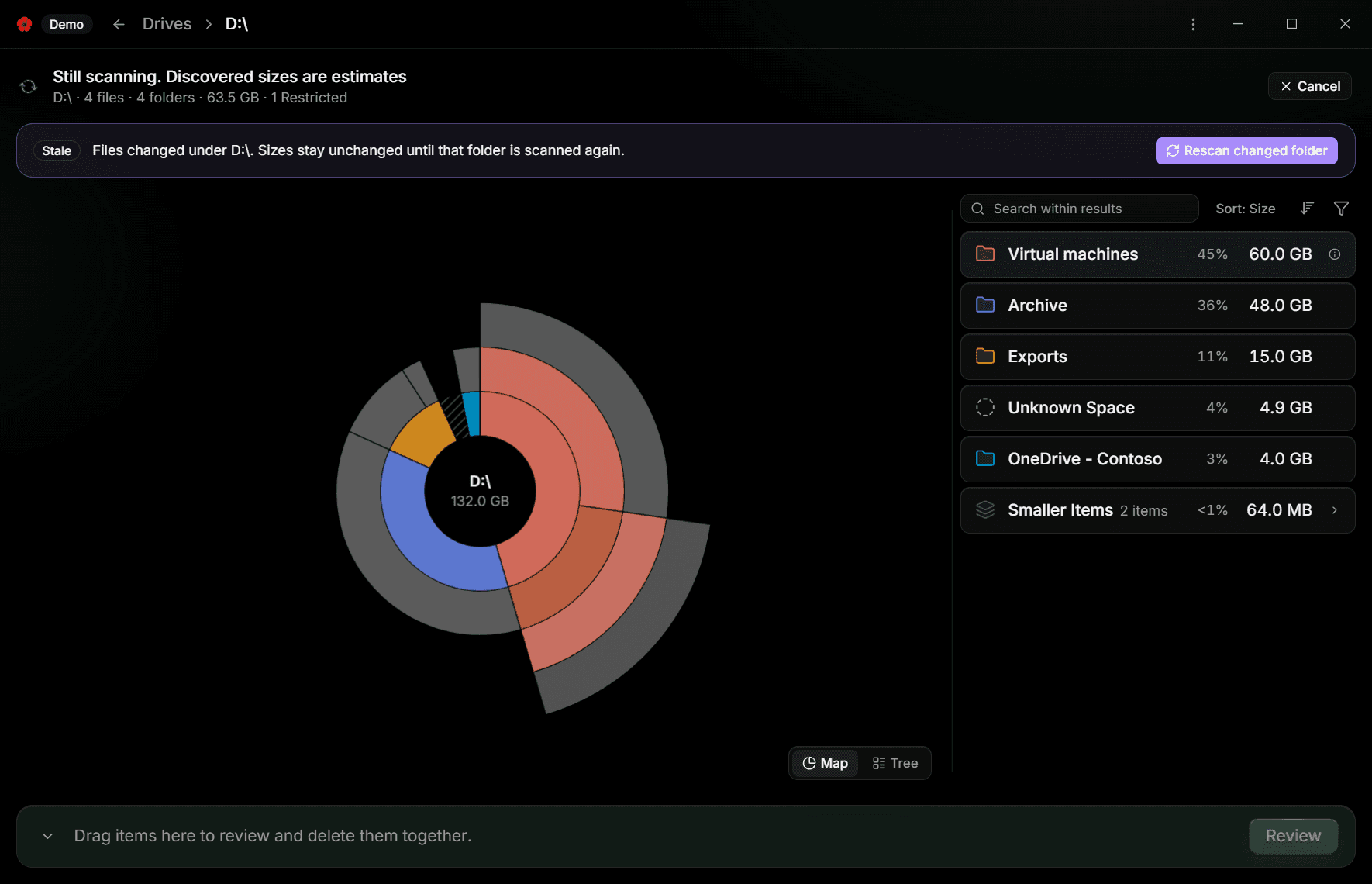
If the Rescan stops early, the result says The Rescan was cancelled. or The Rescan failed. with the reason. The Stale marking stays until a Rescan completes.
Refresh the whole Scan
When too many changes were reported to follow one by one, the notice instead says Too many filesystem changes were reported, and the button reads Rescan whole Scan. Choosing it measures the entire location again and replaces the result when it completes.
You can always start over from the Drive Overview instead: choose Rescan on the Drive or Pinned Folder. See Scan a Drive.
Refresh before you delete
Caution
Do not decide what to delete from a Stale number. The folder may now be larger, smaller, or gone.
Refresh the branch first, then collect from it. The Deletion Review checks every item again before anything is deleted and sets aside any item that changed since you collected it, so a Stale size cannot slip through, but you will make better choices from a current one. See Review before you delete.